I am banging my head against the wall for the past few days trying to figure out why I can’t get my project to run.
This is just a simple “hello world” project that was included in smartgwt package.
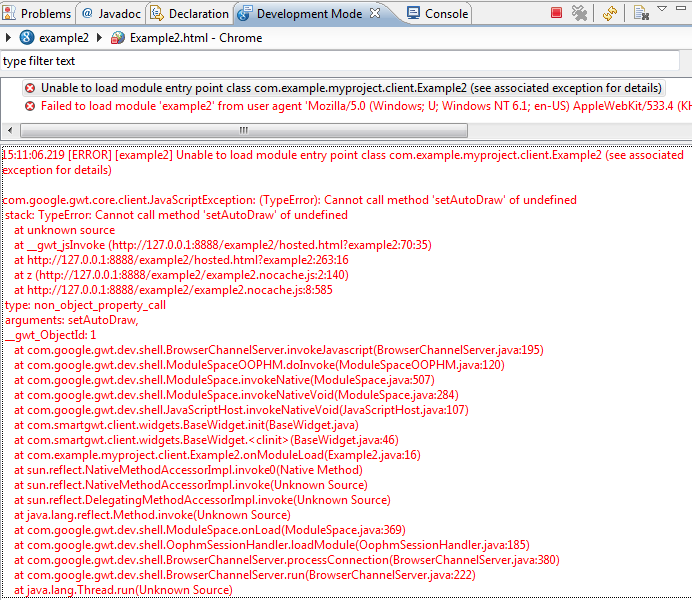
I keep getting this error:
14:11:48.858 [ERROR] [example2] Unable to load module entry point class com.example.myproject.client.Example2 (see associated exception for details)
com.google.gwt.core.client.JavaScriptException: (TypeError): Cannot call method 'setAutoDraw' of undefined
 stack: TypeError: Cannot call method 'setAutoDraw' of undefined
    at unknown source
    at __gwt_jsInvoke (http://127.0.0.1:8888/example2/hosted.html?example2:70:35)
    at http://127.0.0.1:8888/example2/hosted.html?example2:263:16
    at z (http://127.0.0.1:8888/example2/example2.nocache.js:2:140)
    at http://127.0.0.1:8888/example2/example2.nocache.js:8:585
 type: non_object_property_call
 arguments: setAutoDraw,
 __gwt_ObjectId: 1
    at com.google.gwt.dev.shell.BrowserChannelServer.invokeJavascript(BrowserChannelServer.java:195)
    at com.google.gwt.dev.shell.ModuleSpaceOOPHM.doInvoke(ModuleSpaceOOPHM.java:120)
    at com.google.gwt.dev.shell.ModuleSpace.invokeNative(ModuleSpace.java:507)
    at com.google.gwt.dev.shell.ModuleSpace.invokeNativeVoid(ModuleSpace.java:284)
    at com.google.gwt.dev.shell.JavaScriptHost.invokeNativeVoid(JavaScriptHost.java:107)
    at com.smartgwt.client.widgets.BaseWidget.init(BaseWidget.java)
    at com.smartgwt.client.widgets.BaseWidget.<clinit>(BaseWidget.java:46)
    at com.example.myproject.client.Example2.onModuleLoad(Example2.java:22)
    at sun.reflect.NativeMethodAccessorImpl.invoke0(Native Method)
    at sun.reflect.NativeMethodAccessorImpl.invoke(Unknown Source)
    at sun.reflect.DelegatingMethodAccessorImpl.invoke(Unknown Source)
    at java.lang.reflect.Method.invoke(Unknown Source)
    at com.google.gwt.dev.shell.ModuleSpace.onLoad(ModuleSpace.java:369)
    at com.google.gwt.dev.shell.OophmSessionHandler.loadModule(OophmSessionHandler.java:185)
    at com.google.gwt.dev.shell.BrowserChannelServer.processConnection(BrowserChannelServer.java:380)
    at com.google.gwt.dev.shell.BrowserChannelServer.run(BrowserChannelServer.java:222)
    at java.lang.Thread.run(Unknown Source)
OK, I thought I figured it out but NO! It’s bugging the hell out of me!
Please help, what is causing the error above? I tried everyhing, I tried reinstalling eclipse, GWT, SmartGWT etc. I made sure the libraries are added to build path, and followed simple instructions on http://forums.smartclient.com/showpost.php?p=21720&postcount=5
There doesn’t seem to be any problem with the code, here it is anyway:
package com.example.myproject.client;

import com.google.gwt.core.client.EntryPoint;
import com.google.gwt.user.client.ui.RootPanel;
import com.smartgwt.client.widgets.IButton;
import com.smartgwt.client.widgets.events.ClickHandler;
import com.smartgwt.client.widgets.events.ClickEvent;
import com.smartgwt.client.util.SC;


public class Example2 implements EntryPoint {
	public void onModuleLoad() {

		IButton button = new IButton("Hello World");
		button.addClickHandler(new ClickHandler() {
							   public void onClick(ClickEvent event) {
							   SC.say("Hello World from SmartGWT");
							   }
							   });

		button.draw();

		RootPanel.get().add(button);
	}
}
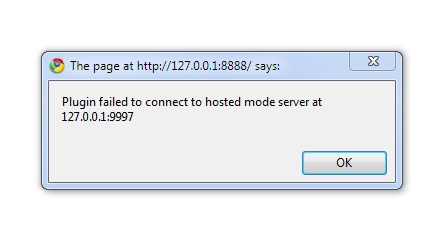
Thanks for the reply - that was actually a typo, I removed the line and the error still shows up. In google chrome (even in IE 8) I get the a pop-up error (see attached image)
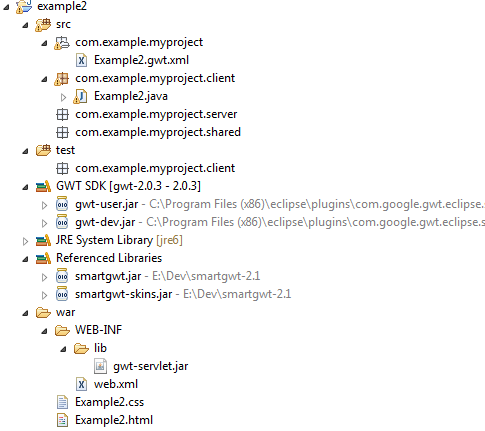
Ok, I removed this line too.. Still getting the error. I’m attaching a snip of my project explorer view to help you help me troubleshoot. Thanks guys! appreciate it.
Its has to do with GWT not SmartGWT, have you tried loading your app with 9997 port? Have you tried -bindaddress flag with the compile? Have you tried deploying it instead of hosted mode? Finally have you tried a previous GWT version?
Yes, I’ve tried port 9997
Yes, I’ve tried the -bindaddress 0.0.0.0 argument
No, I haven’t tried deploying it. I’m pretty sure it’ll work in deployed mode. But how do I get around fixing this problem so I can start developing with smartgwt?
and No, I haven’t tried previous version of GWT. I have the latest version 2.0.3 and latest smartgwt 2.1
Edit: I forgot to mention that it doesn’t seem to be a GWT problem, since I can run the default example gwt application without any problems. It’s when I change it around and add smartgwt + relevant code that I get these errors.
Are you using the GWT plugin as the base? If so I would recommend simply NOT and start a new fresh project. Or even since you have the HelloWorld code just go to Eclipse->Import..->Existing Projects into Workspace.
Not sure what you mean by “using the GWT plugin as the base”. I started the project by going to File -> New-> Web Application Project
This is how the tutorial shows it. What other way should I do it?
Also, I couldn’t import the helloworld-2.0 project that was included with smartgwt-2.1, since it doesn’t have the eclipse project file. So I simply created a new project, and copied just the relevant code.