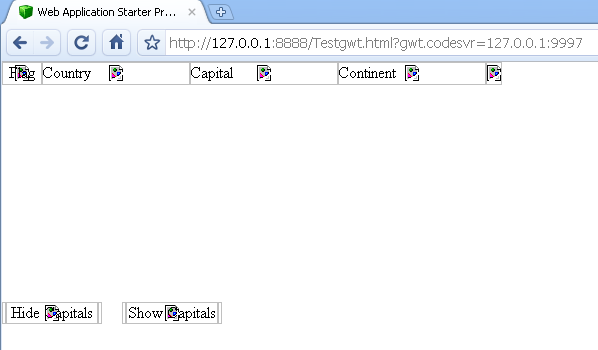
Hi,
I’m new to smart GWT. I wrote a simple piece of code to try to get some sense of smart GWT. It is very simple, a simple grid in the page shows some country data. But when I open the page in the browser, it shows empty table and no CSS is taken effect. Please see the attachment.
I don’t know which step I’m missing. Can somebody help me out?
Thanks a lot!
Frank
check your master html file maybe you didn’t load a Skin… here’s what I’m doing.. ignore the specific things…
<!DOCTYPE HTML PUBLIC "-//W3C//DTD HTML 4.01 Transitional//EN">

<html style="background-color: #FFFFFF;">
<head>
<meta http-equiv="content-type" content="text/html; charset=UTF-8">

<title>Online Catalog by EasternGraphics</title>

<style type="text/css">
body { overflow:hidden }

  #loading {
    border: 1px solid #ccc;
    position: absolute;
    left: 45%;
    top: 40%;
    padding: 2px;
    z-index: 20001;
    height: auto;
    width: 200px;
  }

  #loading a {
    color: #225588;
  }

  #loading .loadingIndicator {
    background: white;
    font: bold 13px tahoma, arial, helvetica;
    padding: 10px;
    margin: 0;
    height: auto;
    color: #444;
  }

  #loadingMsg {
    font: normal 10px arial, tahoma, sans-serif;
  }
</style>

<div id="loadingWrapper">
<div id="loading">
<div class="loadingIndicator">
<img src="loading.gif" width="48" height="48" style="margin-right:8px;float:left;vertical-align:top;"/>Online<br>Catalog<br/>
<span id="loadingMsg">Loading SC...</span></div>
</div>
</div>

<script>
    var x4App = "wcatalog";
    var isomorphicDir = x4App+"/sc/";
    var x4IscModulePath = x4App+"/sc/modules/";
    var x4IscVersion = "?isc_version=7.0.js";
    var x4IscModules = ["ISC_Core.js", "ISC_Foundation.js", "ISC_Containers.js", "ISC_Grids.js",
"ISC_Forms.js", "ISC_RichTextEditor.js", "ISC_Calendar.js", "ISC_DataBinding.js"];
</script>

<script type="text/javascript">
function x4LoadMsg(pMsg) {
    document.getElementById('loadingMsg').innerHTML = pMsg;
}
</script>

<script type="text/javascript">x4LoadMsg('Loading Framework...');</script>

<script>
for (tI in x4IscModules) {
    document.write('<script type="text/javascript" src="'+x4IscModulePath+x4IscModules[tI]+x4IscVersion+'"></'+'script>');
}
</script>

<script type="text/javascript">x4LoadMsg('Loading Skin...');</script>

<script>
    document.write('<script type="text/javascript" src="'+isomorphicDir+'skins/Enterprise/load_skin.js'+x4IscVersion+'"></'+'script>');
</script>

<script type="text/javascript">x4LoadMsg('Loading Application...');</script>

<script src=wcatalog/wcatalog.nocache.js></script>

<script type="text/javascript">x4LoadMsg('Coming up...');</script>

</head>

<body>

<iframe src="javascript:''" id="__gwt_historyFrame" tabIndex='-1' style="position:absolute;width:0;height:0;border:0"></iframe>

</body>
</html>
Ekki
- GWT Rocks! * SmartGWT Rocks Even Harder! * SmartGWT PRO 2.1
Build 1139, GWT 2.0.3, Jetty 7.0.0, Eclipse 3.5.1, JRE 1.6.0_18 *
*** www.EasternGraphics.com/X-4GPL ***
Hi Ekki,
Thanks a lot. The issue is solved. Previously I’m typing wrong: isomorphicdir, it should be isomorphicDir. When I compare with your code, I found the problem.
Frank